Tiger: A Playful Pattern Font for Standout Designs
There are moments in a project when a standard, clean typeface just won't do. Sometimes, you need a visual element that carries its own energy, one that immediately communicates a specific mood without needing a single extra illustration. This is precisely where the Tiger font enters the picture. It isn't just a set of characters; it is a vibrant display font that wraps every letter and number in a fun, stylized animal pattern. For designers, crafters, and entrepreneurs looking to inject personality into their work, this typeface offers a distinctive solution that blends typography with graphic art.
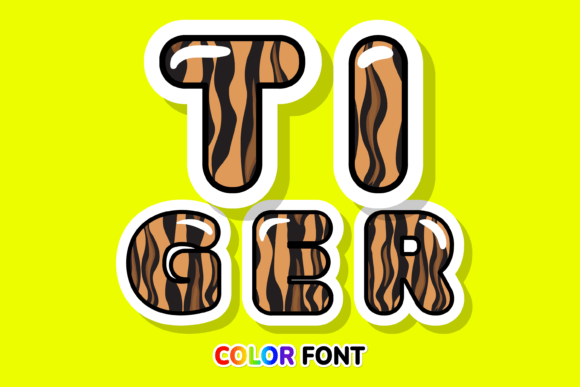
At its core, Tiger is an incredibly cool color font. What sets it apart from your standard library of typefaces is the visual texture embedded within the strokes. Instead of flat, solid colors, the letters are filled with a playful animal print, giving them a three-dimensional and tactile quality. This makes it a perfect choice for projects that demand a "lovely touch" or a bold statement. Whether you are working on custom designs for a client or putting the finishing touches on a DIY craft project, the aesthetic of this font is designed to grab attention. It bridges the gap between text and imagery, allowing you to create complex-looking designs with just a few keystrokes.
Understanding the Technical Edge: SVG Color Fonts
To truly appreciate what Tiger brings to your toolkit, it helps to understand the technology behind it. This product is classified as an OpenType-SVG font. Unlike traditional vector fonts that rely on mathematical paths to define shapes (which are usually filled with a single solid color), SVG fonts can contain multiple colors, gradients, and even transparency within the font file itself. This is what allows the Tiger typeface to render that intricate animal pattern so accurately. It behaves more like a high-resolution image embedded within your text layer, yet it remains fully editable as text.
However, this advanced capability comes with specific compatibility requirements. Because it is a color font, it works seamlessly with professional design software that supports the OpenType-SVG standard. You will have the best experience using Tiger in PhotoShop, Illustrator, Silhouette, and Inkscape. These programs can interpret the color data and display the pattern exactly as intended. It is crucial to note, however, that the OTF and/or TTF files included are not compatible with Cricut. If you are a crafter planning to use this for vinyl cuts or paper projects, ensure you are operating within the Silhouette ecosystem or a compatible Adobe program. For those new to this technology, checking out a comprehensive guide on color fonts is highly recommended to get the most out of this asset.
Where to Use a Patterned Display Font
The versatility of a creative font like Tiger lies in its ability to adapt to various mediums, provided the context calls for a bold visual statement. Because of its intricate pattern, it functions best as a display typeface—meaning it shines in headlines, logos, and short bursts of text rather than long-form body copy. Here are some practical applications where this typeface can elevate your work:
- Branding and Logo Design: If you are building a brand identity for a children’s party service, a quirky fashion line, or a creative agency, Tiger can serve as the foundation of your logo. It instantly conveys fun and creativity.
- Packaging Design: For small business owners selling handmade goods, cosmetics, or snacks, the packaging is the first handshake with the customer. Using Tiger for the product name on a label can make the item pop on the shelf.
- Social Media Graphics: In the fast-scrolling environment of Instagram or TikTok, you have milliseconds to stop a thumb. A header text created with this font adds a layer of visual interest that static sans serif fonts often lack.
- Merchandise and Apparel: T-shirts, tote bags, and mugs often rely on graphic text. The animal pattern within the letters adds a built-in design element that can reduce the need for additional graphics.
- Invitations and Stationery: Birthday invitations, baby shower cards, and event flyers are perfect candidates for a font that feels celebratory and lively.
- Editorial and Web Design: While it shouldn't be used for paragraphs, Tiger works well for pull quotes, section headers, or hero text on a website landing page to establish a specific tone immediately.
Practical Tips for Pairing and Readability
When working with a heavy, patterned font like Tiger, balancing your design is essential. A common mistake is using the display font for everything, which can lead to visual clutter and make text difficult to read. The key to professional presentation is contrast.
Pairing with Simplicity: Because Tiger is busy and detailed, it pairs best with clean, simple typefaces. A modern sans serif or a simple serif font works well for body text or subheadings. For example, if you use Tiger for a poster headline, use a font like Helvetica, Open Sans, or Lato for the event details. This ensures that the headline grabs attention while the supporting information remains legible.
Size Matters: Display fonts are designed to be seen at larger sizes. If you shrink Tiger down too small, the animal pattern may become muddy or pixelated, losing its visual impact. Always test your typography at the size it will be viewed, whether that is on a mobile screen or a printed banner.
Color Coordination: Since the font brings its own colors (the pattern), you need to ensure the background color of your design complements rather than clashes with it. High-contrast backgrounds (like solid black, white, or a color pulled from the font's pattern) usually yield the best results.
Commercial Licensing and Project Goals
For entrepreneurs and designers, the utility of a font extends beyond aesthetics—it is a commercial asset. When purchasing a premium font like Tiger, it is vital to understand the licensing. Typically, these assets come with a license that allows for commercial use, meaning you can use them in designs you sell, such as merchandise or client logos. However, you cannot redistribute the font files themselves.
Before finalizing your project, take a moment to review the included styles. Does the font include all the punctuation and special characters you need for your specific language or project? Does the "lovely touch" of the pattern align with the message you are trying to send? If your brand identity is serious and corporate, Tiger might not be the right fit. But if your goal is to connect with an audience that appreciates creativity, whimsy, and bold design, this typeface is a powerful tool in your arsenal. By matching the typography to your project goals, you ensure that your visual communication is not only beautiful but effective.