Confetti Notes: Injecting Instant Festivity Into Your Designs
There is a specific challenge in modern design that many creatives face: how do you capture the ephemeral, joyful energy of a celebration in a static medium? We often resort to complex illustrations, heavy photo overlays, or cluttered layouts to convey a party atmosphere. However, sometimes the most effective way to communicate "celebration" is through the most fundamental building block of graphic design: typography. This is where the visual language of Confetti Notes enters the conversation. It is not merely a typeface; it is a graphic asset that bridges the gap between text and illustration, offering a vibrant, full-color solution for projects that need to scream "fun" without saying a word.
The Anatomy of a Festive Typeface
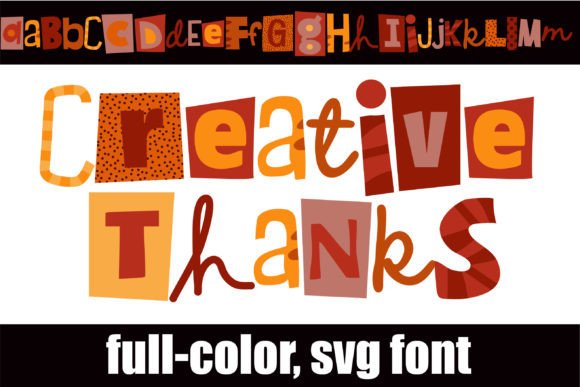
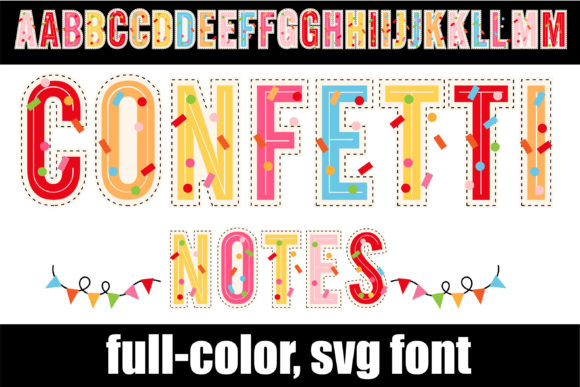
When we talk about modern typography, we usually discuss kerning, serifs, and negative space. But with the advent of color fonts (specifically OpenType-SVG technology), the rules have changed. Confetti Notes utilizes this technology to deliver letters that are not just outlines filled with a flat color, but are rendered in full detail, featuring bright hues and literal confetti textures within the letterforms. This creates an immediate sense of depth and realism that traditional fonts cannot achieve. It eliminates the need to manually place confetti vectors behind your text; the celebration is already baked into the characters.
For the uninitiated, the technical aspect is actually quite liberating. Because this font is PUA encoded, accessing the special features—those unique glyphs and ligatures that give the font its flair—is as simple as copy-pasting, provided you are using compatible software. It is designed to work seamlessly with industry standards like Adobe Photoshop, Illustrator, Silhouette, and Inkscape. However, it is crucial to note the limitations of the format: because it is a high-fidelity color font, it is not compatible with Cricut Design Space for cutting, nor will it render as a standard black-and-white outline in older software that does not support OpenType-SVG. This distinction is vital for print-on-demand businesses and crafters to understand before integrating it into their workflow.
Strategic Applications: Beyond Birthday Cards
It is easy to pigeonhole a font named Confetti Notes as strictly for invitations or greeting cards. While it excels there, its utility spans far wider across various design assets. Think about the visual noise of the modern digital landscape. Standing out on social media requires high-impact visuals that stop the scroll. This typeface serves as a powerful hook for Instagram stories, sale announcements, or "We’re Hiring" graphics where energy and excitement are the primary messages.
Consider the following scenarios where this font adds distinct value:
- Brand Identity for Event Planners: If you are building a brand for a party supply store, a DJ service, or an event coordination firm, this font can become a cornerstone of your visual identity. It immediately communicates the service you provide without needing additional context.
- Product Packaging: For small business owners selling artisanal goods—perhaps a "Party Mix" flavor or a holiday edition product—the typography on the packaging is the first touchpoint with the customer. Using a creative font like this on a label can differentiate the product on a crowded shelf.
- Digital Products and Merchandise: If you are a creator selling digital planners, stickers, or printable art, the aesthetic of your typography defines the value of your product. This font adds a premium, polished look to merchandise like tote bags or t-shirts where the design needs to pop immediately.
Mastering the Art of Pairing and Readability
One of the most common mistakes in using display fonts is overuse. Confetti Notes is a high-energy, decorative typeface. It is designed for headlines, sub-headers, and call-outs—not for body text. If you try to write a paragraph with it, you will likely overwhelm your reader and compromise readability, which is the cardinal sin of graphic design. The visual weight of the confetti texture is heavy; it requires "breathing room" to be appreciated.
The key to professional presentation is contrast. You need a stable, neutral partner to let the festive font shine. Here is how to approach font pairing for a project using this asset:
- The Clean Sans-Serif Partner: Pairing Confetti Notes with a clean, geometric sans-serif font (like Montserrat, Poppins, or Roboto) creates a modern balance. The sans-serif handles the legibility of the details (dates, addresses, descriptions), while the display font handles the emotion.
- The Soft Serif Partner: If you want a more editorial, sophisticated "party" vibe—think a wedding magazine or a luxury New Year's Eve gala invite—pair the confetti font with a classic serif. The contrast between the playful texture and the traditional structure can look very chic.
- The Handwritten Partner: Since Confetti Notes has a slightly informal, handwritten quality, pairing it with a very simple script or monoline font can work, but be careful not to clash. Ensure the script is thin and flowing so it doesn't compete with the texture of the confetti.
When testing your pairings, pay close attention to the x-height and the visual weight. You want the secondary font to support, not fight, the primary focal point.
Workflow and Compatibility: Setting Yourself Up for Success
Nothing halts a creative flow faster than technical glitches. As a designer or business owner, understanding the file format of your assets is part of your job. Confetti Notes comes in OTF and TTF formats specifically for applications that support color font rendering. If you open this font in a software that does not support OpenType-SVG (such as Microsoft Word or older versions of design software), you will likely see a standard black outline or a "box" placeholder.
For those using Adobe Illustrator or Photoshop, the workflow is smooth. You simply select the font and type. To access the alternate characters and ligatures mentioned in the font details, you will want to open your "Glyphs" panel. This is where the PUA encoding shines—it ensures that all those stylistic extras are organized and accessible, even if you aren't a typography expert who knows how to use advanced OpenType features.
For the Silhouette users, ensure your software version supports these specific file types. It allows for beautiful print-and-cut projects, such as custom sticker sheets or party favors. However, remember the Cricut constraint: if your entire business model relies on cutting vinyl with a Cricut machine, this specific color font will not function for that purpose, and you would need a standard vector outline version instead.
Elevating Your Visual Narrative
Ultimately, the tools we choose tell a story. Selecting a typeface like Confetti Notes is a deliberate choice to inject optimism, energy, and playfulness into your visual communication. It signals to your audience that what they are looking at is meant to be enjoyed. Whether you are a blogger creating headers for a "Friday Favorites" post, a marketer designing an email banner for a flash sale, or a crafter making custom birthday decor, the goal is the same: to evoke a feeling instantly.
By combining this vibrant display font with solid design principles—proper hierarchy, clean pairing, and appropriate use of white space—you create professional, engaging assets that resonate. It is not just about making things look "pretty"; it is about using visual cues to guide your audience's emotional response. In a world of serious news and minimalism, there is a time and place for unadulterated joy, and that is exactly what this typography brings to the table.